
Grok Subscription Guide: How to Pay for Grok (2026)
About 76% of RDVCC users who tried to pay Grok in the last 30 days got a successful charge. How to pay for Grok, pick a card and fix declines.
- The short version: five steps to subscribe to Grok
- How Grok is sold now
- What you need before you start
- Steps 1–3 on RDVCC: sign up, top up, open a card
- Step 4: Add your card at Grok checkout on the web
- Step 5: Check that the subscription went through
- Afterwards: renewals, changing cards, canceling, extra usage
- Which BIN to choose: results and per-transaction fees side by side
- What to do when your payment is declined
- FAQ
- Summary and related reading
You can pay for a Grok subscription on the web with an RDVCC prepaid virtual credit card. Over the last 30 days, about 76% of RDVCC users who tried to pay Grok had a successful charge. Among users whose declines were recorded on the card side, about 94% were declined because the card didn’t hold enough for that charge. So two things matter most: pick the right BIN, and keep enough money on the card.
One thing up front: Grok’s official pages don’t say whether they accept prepaid or virtual cards. Everything in this guide comes from real transactions on RDVCC cards. It doesn’t describe Grok’s rules, and Grok can change things at any time.
How we counted: rates are per user, with each user counted once; a very small number of accounts with unusually many transactions are left out. The window is October 19 to November 17, 2026 (Singapore time), checked on November 18, 2026. Grok’s plans, prices and rules were checked the same day; Grok’s own pages are the final word.
Who this guide is for
People subscribing to Grok for the first time who don’t have a card that can pay for international subscriptions; people whose payment was declined and who can’t tell why; and people who want to know which plan to pick, what happens to old SuperGrok plans, and how to add API credits. If you already know how to open an RDVCC card, go straight to section 5 (the card form) and section 8 (choosing a BIN).
1. The short version: five steps to subscribe to Grok
- Sign up on RDVCC and complete identity verification once (about 3 minutes).
- Top up your account with USDT. Each top-up must be at least 35 USDT.
- Open a card and load money onto it as you open it. To save on fees, choose 5378US; for fewer declines, if you’re fine with per-transaction fees, choose 4413USa (see section 8). For Premium ($30/month), load $35–$37.
- Open Grok on the web in a browser and pick a plan. In the card form, enter the card number, expiration date, CVC and billing address, all copied from the card details page on RDVCC.
- You’re subscribed once a
GROK XAIcharge shows up in the RDVCC card’s transactions and a receipt from Grok lands in your inbox. Before each renewal, top the card back up to more than the plan price.
Of people who tried to pay Grok for the first time in the last 30 days, about 78% had their first real charge (not counting the $0 verification) go through.
2. How Grok is sold now
2.1 The default for new users: The X Subscription’s four tiers
Since October 12, 2026, new Grok users start on The X Subscription. The official docs say it bundles Grok, Cursor and X into one subscription, and the paid tiers include X Premium benefits (you need to connect your X account). Our impression from testing it on November 16, 2026: one subscription gets you all three, which is convenient. The tiers differ mainly in how much you can use:
| Tier | Monthly | Yearly | Usage (Plus = 1x) | Includes Grok Bot? |
|---|---|---|---|---|
| Free | $0 | $0 | Limited | — |
| Plus | $8 | $80 | 1x | No |
| Premium | $30 | $300 | 4x | Yes |
| Super | $100 | $1,000 | 15x | Yes |
| Ultra | $200 | $2,000 | 50x | Yes |
- List prices don’t include sales tax. The official docs say tax is added at checkout where it applies. What we saw in our test on November 16, 2026: whether tax is added depends on the billing address, and that time no tax was added. Enter the billing address exactly as the card details page gives it; don’t change it to avoid tax.
- For Grok Bot, subscribe to at least Premium.
- Grok and Cursor share one weekly usage allowance. Anything beyond it is billed at API list prices and paid from extra usage credits.
- In our ledger, the most common first successful charge was exactly $15 (about 23% of users), which matches none of the list prices above. The official pages don’t say why; go by the checkout page for what you’ll actually pay.
Team plans are separate. Premium, Super and Ultra can also be bought per seat for a team, at the same price per seat as the individual tier, and members can be on different tiers; Plus isn’t available for teams. What a team account is charged each time depends on the number of seats and each member’s tier, so it’s normal for it not to match the table above. This guide assumes individual plans throughout.
2.2 Already on SuperGrok or X Premium?
- If you already subscribe to SuperGrok, X Premium or Cursor, nothing changes unless you switch. To switch, do it on the web (it can’t be done in the mobile app for now), and settle any unpaid bills first.
- Switching is permanent. You can’t switch back, and support can’t undo it. Your old subscription is canceled at checkout, unused time is refunded pro rata to the original payment method, and the new plan’s billing cycle starts on the day you switch.
- If you bought your old subscription on an iPhone: Grok cancels your Grok, Grok Bot and X Premium subscriptions and asks Apple to refund the unused portion, and Apple decides whether to refund it; you have to cancel Cursor yourself in iPhone Settings. If you bought it on Google Play, check Google Play after switching and cancel anything that’s still renewing.
2.3 Web, iPhone or Android: three ways to buy
| Where you buy | Who charges you | What’s on sale | Canceling and refunds | Our advice |
|---|---|---|---|---|
| Web | Grok itself (shows as GROK XAI on RDVCC cards) | The X Subscription’s four tiers | Cancel on the Billing & invoices page; request refunds through the official refund form | Best option |
| iPhone (US App Store) | Apple | Still the old names: SuperGrok Lite $10, SuperGrok $30, SuperGrok Plus $100, SuperGrok Heavy $300, plus extra usage from $5 to $100; the page doesn’t say whether these are monthly or yearly | Cancel in iPhone Settings; ask Apple for refunds | Not recommended for your first purchase |
| Android (Google Play) | Google Play (shows on the card as something like GOOGLE *GROK) | Grok, Grok Bot and X Premium subscriptions | Cancel in Google Play; request refunds through the official refund form | Not recommended: Google Play’s (US) payment methods help page lists virtual credit cards as not accepted |
Wherever you buy, the subscription is tied to the account you were signed in to when you bought it. Once you’ve subscribed on the web, sign in to the mobile app with the same account and it works there too. There’s no need to make your first payment in the app.
2.4 Subscription, extra usage and API credits are three different things
| What it is | Where to buy | How you’re charged | |
|---|---|---|---|
| Subscription (Plus to Ultra) | A fixed monthly or yearly price that includes a set amount of usage | On the web; managed on the Billing & invoices page at grok.com | Renews automatically |
| Extra usage | Lets you keep going after your subscription’s usage runs out | Web only, from $5, expires one year after purchase; you can set auto top-up and a monthly limit | One-time prepayment |
| API credits | For developers calling the Grok API | Billing at console.x.ai; prepaid credits can currently only be bought through Guest Checkout | Prepaid; API requests are rejected once the credits run out |
The official docs don’t say a subscription can cover API costs, so budget for two separate bills. In our ledger, about 15% of users had a round first successful charge such as $5, $10, $20 or $50. These look like extra usage or API credits, but the card data can’t tell which.
3. What you need before you start
3.1 Three things
- A Grok account. The subscription is tied to the account you’re signed in to when you buy, so use the same sign-in method on the web, iPhone and Android afterwards. If you signed up with Apple’s Hide My Email, use Sign in with Apple, or the subscription won’t be recognized.
- A card that can pay Grok. RDVCC cards are prepaid: you load money first and then spend it, and a charge can’t be larger than what’s on the card. The “Card type” (Credit / Debit) on the card opening page is how the issuer registered the card with the card network; it only decides how merchants recognize the card. Every card spends only what you load, with no overdraft.
- Enough money on the card; see below.
3.2 How much to keep on the card
The formula: plan price × 1.15. With 4413USa, add about $2 more.
- The extra 15% is there because tax may be added at checkout (see 2.1); in our ledger we’ve seen a $30 plan charged $32.40. Also, on US BINs Grok mostly charges in US dollars, while on Hong Kong and Singapore BINs many charges are settled in the local currency, and once converted to US dollars most come out a few percent to more than 10% above the list price (this may be the exchange rate, or local tax).
- The extra ~$2 for 4413USa is because it charges per transaction, taken from the card first: a Card verification fee on the $0 verification, a Transaction fee on each charge, and a Currency conversion fee when you’re charged in a local currency (amounts in section 8). 5378US charges none of these.
| Plan (monthly) | List price | With 5378US, keep on the card | With 4413USa, keep on the card |
|---|---|---|---|
| Plus | $8 | The $30 minimum opening top-up already covers it | Same |
| Premium | $30 | About $35 | About $37 |
| Super | $100 | About $115 | About $117 |
| Ultra | $200 | About $230 | About $232 |
For yearly billing, apply the same math to the yearly price. The minimum opening top-up is $30 (the same for 5378US and 4413USa); the card opening page is the final word.
3.3 Worked example: one month of Premium, from top-up to charge
Assume your card top-ups this month add up to less than $1,000 (so the Card top-up service fee is 2%; the pricing page calls it the “Card top-up fee”), and Grok charges $30 in US dollars with no tax. Fees are as configured on November 18, 2026; go by “Fees for this card” on the card opening page.
| Step | With 5378US (keep $35 on the card) | With 4413USa (keep $37 on the card) |
|---|---|---|
| ① Send 40 USDT from an exchange to your RDVCC top-up address | Deposit fee 0.5% = $0.20; $39.80 credited to your account | Same |
| ② Open a card with an opening top-up of $35 / $37 | Card opening fee $1.00 + Card top-up service fee $0.70; $3.10 left in your account, $35.00 on the card | Card opening fee $1.50 + Card top-up service fee $0.74; $0.56 left in your account, $37.00 on the card |
| ③ Add the card on Grok; a $0 verification comes first | No fee; $35.00 on the card | Card verification fee $0.30; $36.70 on the card |
| ④ Grok charges the $30 monthly fee | No Transaction fee; $5.00 on the card | Transaction fee $0.50; $6.20 on the card |
| Extra spent in month one, on top of the monthly fee | About $1.90 | About $3.24, then an extra $0.50 Transaction fee each month |
Your exchange’s withdrawal fee is extra. If tax is added at checkout (say $32.40 is charged), the card has that much less left over; if you’re charged in a local currency, 4413USa also adds a Currency conversion fee. Before next month’s renewal, top the card back up to the amount in the table: for example, with 5378US and $5 left on the card, add $30. The $0.60 Card top-up service fee is charged separately from your account balance. If your account balance is short, top up the account first.
4. Steps 1–3 on RDVCC: sign up, top up, open a card
Step 1: Sign up and verify your identity
- Sign up on RDVCC: enter your email, get a 6-digit code by email, and set a password (8–64 characters).
- Before your first card, complete identity verification once: photograph your own valid ID document, then do a face check, about 3 minutes in all. Open the verification link in your phone’s built-in browser or in Chrome; in-app browsers inside messaging apps can’t open the camera. If it shows “Identity verification under review”, you’ll usually get a result within 1 business day.
- While you’re at it, turn on two-factor authentication (2FA). You’ll need to pass 2FA later to view and copy the CVV.
Step 2: Top up your account (if your money is in USDT, start here)
USDT isn’t one of the payment methods Grok lists. If your money is in USDT, you top up your RDVCC account first, move money from your account onto the card, and the card pays Grok. If the money is in your account but not on the card, the charge still fails.
- Click “Account top-up” in the left menu, “Choose a network” first (one of six: TRC20, ERC20, BEP20, Solana, Arbitrum, Polygon), and copy the dedicated top-up address shown on the page.
- On your exchange or wallet, go to “Withdraw / Send”. Pick the same network as on the top-up page, paste the address, and check the first and last 4 characters. If you pick the wrong network, the money may be lost for good.
- Each top-up must be at least 35 USDT, and there’s a 0.5% deposit fee: send 35 and $34.82 is credited; send 40 and $39.80 is credited. Your exchange also takes its own withdrawal fee, so add about 2 USDT.
- There’s no order to place and no amount to enter. It’s usually credited automatically within a few minutes. If it still hasn’t arrived after the time shown on the page, send the transaction hash (TxID) to live chat support.
Account top-ups don’t currently accept direct payment by bank card or local payment methods. If you don’t have USDT yet, start with our how to buy USDT guide.
Step 3: Open a card and load it at the same time
- On the “My cards” page, click “+ Open a new card” (or “Open a new card” in the left menu), then go through the three steps: “Choose card → Configure → Issue”.
- When choosing a card, click “All BINs” and pick 5378US or 4413USa (section 8 explains how to choose). For your first card, you’ll enter an English cardholder name in uppercase letters, spelled in Latin letters exactly as on your passport.
- The “Opening top-up amount” is the money that goes onto the card when it’s opened. The minimum is $30; use the table in section 3.2. The confirmation step lists the Card opening fee, the Card top-up service fee and the total charge. The card receives exactly the opening top-up you enter, and the Card top-up service fee is charged separately from your account balance. Tick both boxes and submit; the card is usually issued within a few seconds.
- Wait until the page shows “Top-up complete — card is ready” before you pay. In our data, most declines caused by card status came from trying to charge a card that wasn’t activated yet.
By default, an account can open up to 5 cards, closed cards included. If you need more, you can request a limit increase on the card opening page; don’t open lots of cards just to experiment. To add money to a card later, click “Top up card” on the card details page; the minimum is $2 per top-up. The Card top-up service fee depends on how much you’ve loaded onto cards this month: 2% under $1,000, stepping down with volume to as low as 0.5%. Once you reach a tier, anything you were overcharged that month is refunded automatically.
5. Step 4: Add your card at Grok checkout on the web
Grok’s interface changes, so go by the button names you actually see. The whole flow is much like subscribing to ChatGPT and similar services, with nothing unusual (our impression from testing).
- Open the plans page. Open Grok on the web in a browser and sign in to your Grok account. The official announcement gives x.ai/pricing as the place to compare plans and sign up.
- Pick a plan. Choose a tier, then monthly or yearly billing. For Grok Bot, choose at least Premium.
- Choose to pay by card, then fill in the card form. Below is the add-card pop-up (titled Add a card) we saw in our test on November 16, 2026. On your first subscription, the checkout fields may differ slightly, and the button may say subscribe or pay rather than Save card, so go by the page. The fields, from top to bottom:
| Form field | What to enter (open the RDVCC card details page and use the copy buttons, one field at a time) |
|---|---|
| Card number | Card number: click “Copy card number” |
| Expiration date (MM / YY) | Expiry: shown on the card image as MM/YY; you can copy it after clicking “Show card details” and passing 2FA. Don’t swap the month and year |
| Security code (CVC) | Security code: the RDVCC page calls it CVV, which is the same thing; copy it after passing 2FA |
| Country or region (drop-down) | Choose the country shown under “Country/Region” on the card details page; for a US BIN, choose United States |
| Address | “Street” on the card details page |
| Address line 2 (optional) | Leave it blank if the card details page has no second line |
| City | “City” on the card details page |
| State (drop-down) | “State” on the card details page is a two-letter code (such as CA); pick the matching state name in the drop-down (California) |
| Postal code | “ZIP code” on the card details page |
| Use as my default payment method (checkbox) | Tick it to make this card your default payment method; Grok’s billing address follows the default card |
| Save card (button) | Save |
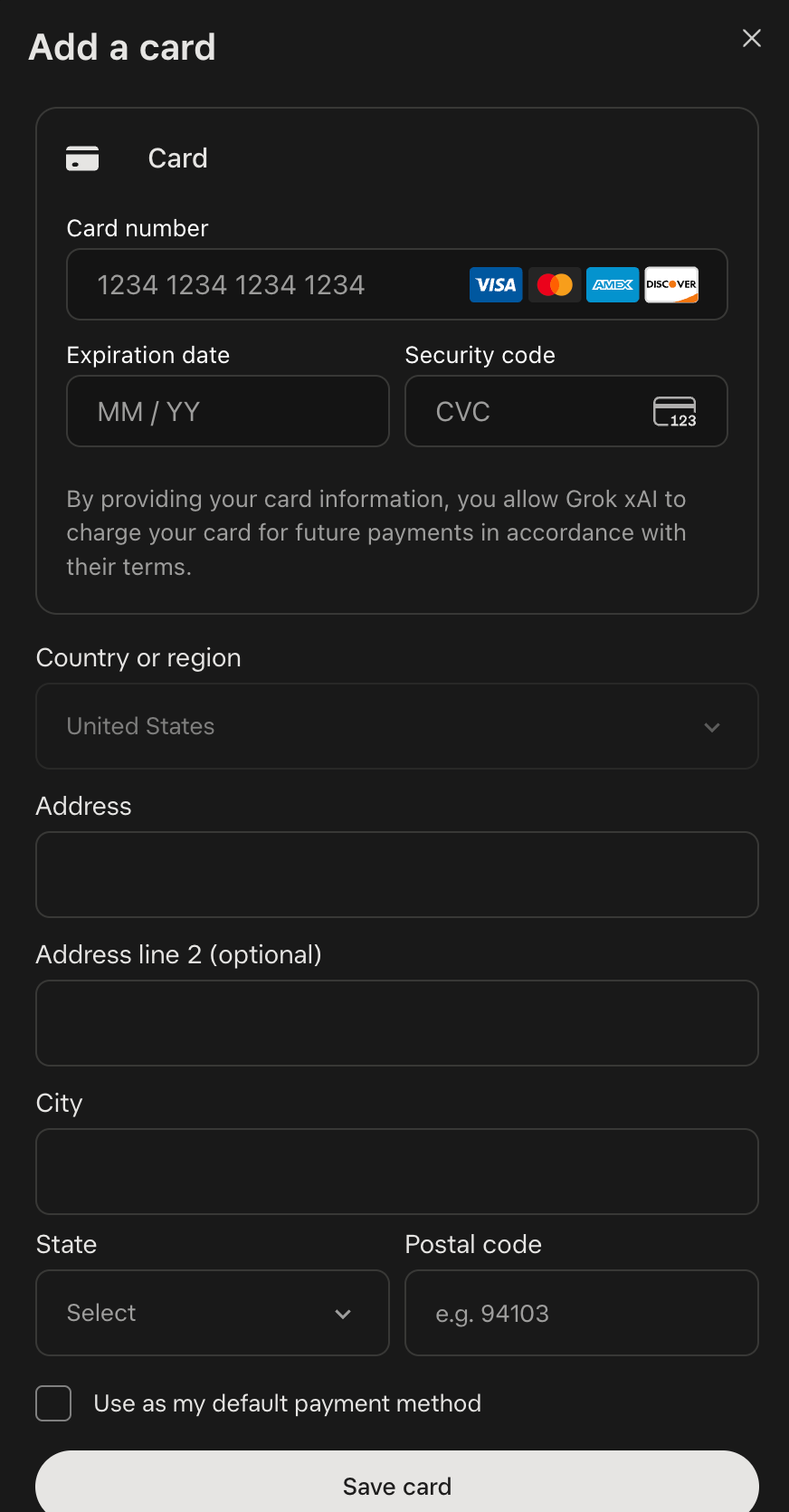
The form has no fields for a cardholder name, email or phone number, so it doesn’t matter what script your Grok account name is written in. Fill in the billing address exactly as the card details page assigns it to this card; don’t look up an address for where you live, and don’t change it. The form also says that by providing your card details, you allow Grok xAI to charge this card for future payments under its terms. In other words, the subscription renews automatically.
- Check the amount. See exactly how much will be charged (tax may have been added), and make sure the card holds enough for that charge plus any per-transaction fees.
- Submit, and click only once. Then check as described in section 6. If it’s declined, don’t keep clicking; go to section 9.
6. Step 5: Check that the subscription went through
On RDVCC: card details page → “Transactions”. You’ll see:
- The merchant name
GROK XAI, occasionally written as something likeGROK XAI PALO ALTO USA(Grok hasn’t published what appears on cards; this is what we’ve seen on RDVCC cards in the last 30 days). The merchant category code (MCC, the category card networks assign to a merchant) is 5734, computer software stores. - First, a $0 entry marked “Authorized”. This is the merchant’s check when you add the card: it only asks whether the card works, the merchant charges nothing, and it usually stays “Authorized”. About two-thirds of users had one on their card in the last 30 days.
- Then the real charge: it shows “Authorized” first, then changes to “Settled”. In our test with 5378US on November 16, 2026, a $0
GROK XAIauthorization appeared first, and the charge went through about a minute later.
In your inbox: a receipt titled “Receipt from Grok xAI”, showing Amount paid, Date paid and Payment method (the card’s last digits). For problems, contact [email protected], as the receipt says. The receipt footer states that Grok xAI uses Stripe for invoicing and payment processing.
On Grok: at grok.com/dashboard/billing (the Billing & invoices page), the “Current plan” card shows your plan, and you can download invoices under the “Invoices” tab.
Once all three line up, you’re subscribed. Sign in to the Grok app on your phone with the same account to use your Grok subscription features there.
7. Afterwards: renewals, changing cards, canceling, extra usage
- Renewals. Each renewal is charged automatically to your default card. A day or two before each renewal, top the card up to the amount in section 3.2. Among cards whose first successful charge came between September and early October and that had a renewal attempt about a month later, about 44% were only declined, with no successful charge, and nearly all of those declines were for insufficient balance (counted per card; small sample). The easiest option is to turn on “Monthly top-up” under this card’s “Auto top-up”: on a fixed day each month, it tops the card balance up to the amount you set, with the same fee as a manual top-up.
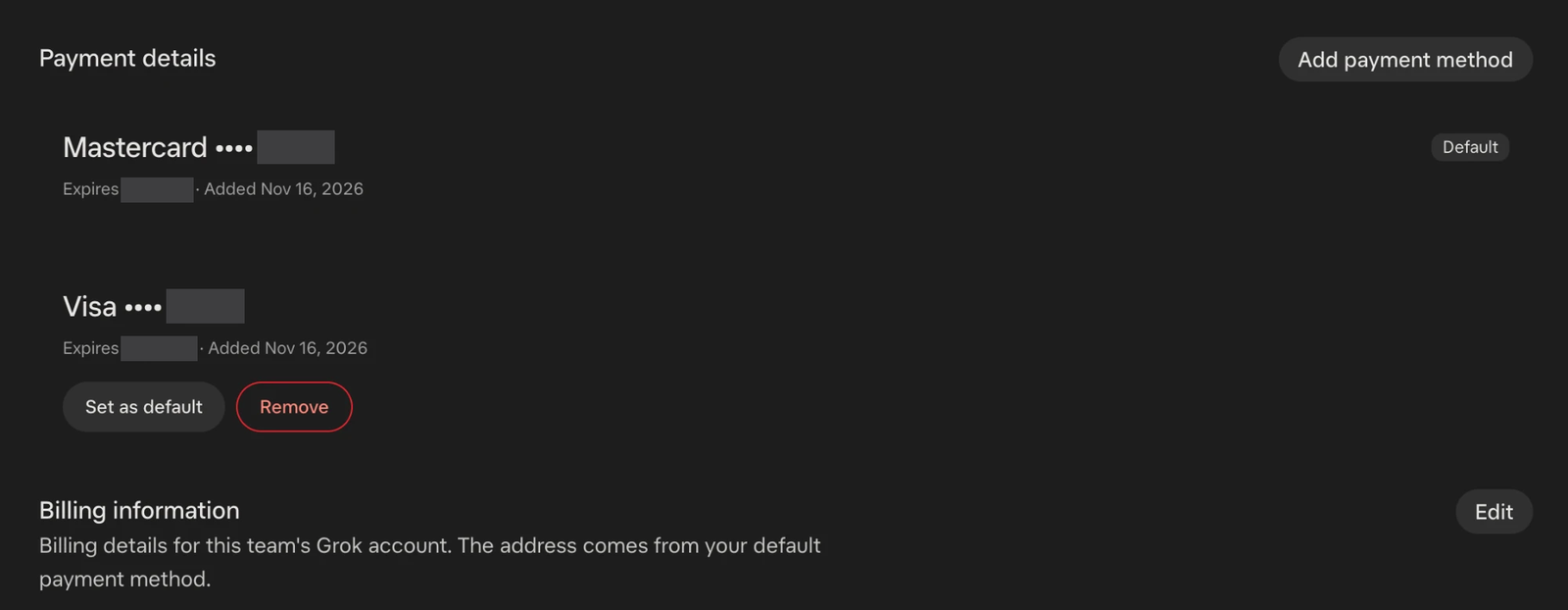
- Changing cards. Billing & invoices → “Payment details”: click “Add payment method” at the top right to add a new card. Under each card are “Set as default” and “Remove”, and the default card is marked “Default”. The “Billing information” section below says the billing address comes from the default payment method, so once you click Set as default on the new card, the billing address switches with it. If the buttons won’t open, try a private window or another browser; the official FAQ says extensions such as ad blockers may block them. The new card also needs the right BIN and enough money on it.
- Upgrading or downgrading. Change plans from the options on the Current plan card. Upgrades on the web take effect immediately, and the checkout page shows what happens to the value left on your current plan.
- Canceling. Billing & invoices → options on the Current plan card → cancel → confirm as prompted. The official page doesn’t say how long an individual plan stays usable after you cancel; go by what the cancellation confirmation page tells you. If you bought on an iPhone, canceling on the web doesn’t cancel it with Apple; cancel with Apple separately. If you bought on Google Play, cancel in Google Play.
- No longer using this card. Cancel the subscription or switch cards on Grok first, then deal with the RDVCC card. You can move what’s left on the card back to your account with “Withdraw to Balance” on the card details page (no fee; available 30 minutes after the last transaction, and $1 stays on the card), or simply close the card (the balance returns to your account in about 1–2 hours). You can also request a “Prepayment Refund” of your account balance, at $2 per refund.
- Adding usage. Buy extra credits under “Additional usage credits” on Billing & invoices; you can also set auto top-up and a monthly limit. The official advice: if you often go over, upgrading your plan costs less per unit of usage.
8. Which BIN to choose: results and per-transaction fees side by side
Everything in the table below comes from real transactions on RDVCC cards (last 30 days, per user; “first real charge” counts only users who first tried to pay Grok within the window). Cells with small samples show no rate, and each one says why. Fees are as configured on November 18, 2026, with names matching “Fees for this card” on the card opening page, which is the final word.
| BIN | Users with a successful charge | Users declined at least once | First-time Grok payers whose first real charge went through | Per-transaction fees | Verdict |
|---|---|---|---|---|---|
| 5378US (Mastercard, US) | About 79% | About 48%, over 90% of them for insufficient balance | About 65% | Card opening fee $1; Transaction fee, Declined transaction fee, Card verification fee, Reversal fee and Currency conversion fee are all zero | Choose it to save on fees, but keep enough money on the card |
| 4413USa (Visa, US) | Not shown: fewer than 20 users, and the success share is so high it could be read as a guarantee | About 21% (small sample), all for insufficient balance | Not shown, for the same reason | Card opening fee $1.50; Transaction fee $0.50 per transaction; Declined transaction fee $0.50 per transaction; Card verification fee $0.30 each time; Reversal fee $1.00 per transaction; Currency conversion fee 1.5% (minimum $0.20) on non-USD transactions | Choose it for fewer declines, if you’re fine with per-transaction fees |
| 5378HK (Mastercard, Hong Kong) | Fewer than 10 users; no rate shown | Not shown | Not shown | Card opening fee $1; Transaction fee $0.60 per transaction; Declined transaction fee $0.60 per transaction; 3DS verification fee $0.20 each time | Not recommended |
| 4746US (Visa, US) | About 35% | About 40% | Fewer than 5 users; not shown | Card opening fee $2; Transaction fee $0.50 per transaction; Declined transaction fee $0.60 per transaction | Not advised |
How to decide:
- 5378US: more users get declined, almost always because there wasn’t enough money on the card. About 48% of its users were declined at least once. Among declines recorded on the card side, about 93% of users were short on balance or limit, and we saw none blocked because of the merchant category. Among first-time Grok payers whose first real charge failed, about 85% were also short of money; about 5% of users stopped at the $0 verification, with no records after it. It charges no per-transaction fees, so with enough money on the card, 5378US is the cheapest option. It’s the BIN we used in our test on November 16, 2026; its BIN description reads “Applicable to AI subscription scenarios other than Claude.”
- 4413USa: fewer declines, but every transaction costs a fee. About 21% of its users were declined at least once, all for insufficient balance; with fewer than 20 users, that doesn’t mean every payment will go through. Adding a card on Grok almost always starts with a $0 verification, and in the last 30 days every one of those on this BIN was charged the Card verification fee (with no separate Transaction fee or Reversal fee). For monthly Premium, the per-transaction fees in the first year start at about $6.30 (one Card verification fee plus one Transaction fee a month), plus a Currency conversion fee when you’re charged in a local currency. It can only be used for AI subscriptions, API credits, compute top-ups and software subscriptions. Paying for ads or online shopping with it will be declined and may get the card frozen.
- 5378HK: not recommended. Its BIN description names Grok, but too few users paid Grok with it in the last 30 days for us to give reliable data. It charges per transaction (see the table above), and many of the charges we saw were settled in Hong Kong dollars, so the amounts don’t match the US-dollar list prices and are hard for beginners to check.
- 4746US: not advised. Only about 35% of its users paid successfully. About 40% of users had nothing but a $0 verification on the card and no records after that, compared with only about 5% on 5378US. Grok may not have sent a charge, the user may not have continued, or the user may have switched to another BIN and paid there, which some did. We only see what reaches the card, so we can’t tell which. Its fees are also higher than 5378US.
- 5556US: same fees as 5378US, but fewer than 5 users tried to pay Grok with it in the last 30 days. That’s not enough data, so we don’t recommend it.
In short: most people should choose 5378US and keep enough money on it. If you want fewer declines and don’t mind slightly higher fees each month, choose 4413USa. As of November 18, 2026, new users can open both BINs; the card opening page is the final word.
9. What to do when your payment is declined
9.1 Check the card’s transactions first, in this order
- Open the RDVCC card details page → “Transactions”, and find the payment you just tried (merchant
GROK XAI). - It’s there, with the status “Declined”: check the reason shown.
- Insufficient balance: top up the card as in section 3.2 and try once more.
- Card unavailable: the card isn’t activated yet, is locked, or has been closed. Wait until it’s usable, unlock it if it’s locked, or switch cards if it’s closed.
- Wrong CVC / Wrong expiry date: enter them again using the copy buttons, and watch the month/year order and your browser’s autofill.
- Category not supported: switch to 5378US or 4413USa (we haven’t seen this one on Grok in the last 30 days).
- It isn’t in the transactions: the charge request never reached the card; it stopped on Grok’s side. Check that the card number, expiration date, CVC and billing address were filled in exactly as on the card details page, then try again. If it still fails, you can switch to another payment method the checkout supports, switch to the other BIN we recommend, or email [email protected] to ask why.
- If checkout asks for a verification code, follow the prompts on the page. To find out where to see the code, read our payment failure troubleshooting guide.
9.2 Why Grok payments were declined, in our data
| Reason | Share of declined users | What to do |
|---|---|---|
| Not enough balance or limit on the card for the charge | About 94% | Top up the card, then try just once more |
| Card status (mostly not activated yet) | About 13% | Wait until the card is usable, unlock it, or switch cards |
| Other (wrong card details, closed card, etc.) | Under 10% | Check the reason shown in the transactions |
One user can run into more than one reason, so the shares add up to more than 100%. This table only counts declines recorded on the card side. Requests that Grok blocks on its own side don’t show up in the card’s transactions; handle those as in item 3 of 9.1.
9.3 Don’t keep retrying
- Find the cause before you try again. Retrying without changing anything gets the same result; after 2 declines in a row, stop and look into it. In our data, about 75% of users who were declined only once paid successfully later; of users declined 6 or more times, none paid successfully after their last decline. People who kept retrying mostly never got through.
- If the same card is declined 10 times in a row, it will be closed under the issuer’s risk control rules (one successful charge in between resets the count). Some BINs also charge a Declined transaction fee; see section 8.
- The good news: of users declined for the first time in the last 30 days, about 57% paid successfully within 7 days (counting only users we could follow for a full 7 days). If it still doesn’t work, send RDVCC support the platform, the time, a screenshot and the last 4 digits of the card number.
10. FAQ
Which card should I use to pay for Grok?
To save on fees, use 5378US and keep enough money on it. For fewer declines, if you’re fine with per-transaction fees, use 4413USa (fewer than 20 users, so that doesn’t mean every payment will go through). We don’t recommend 5378HK or 4746US. Section 8 compares results and fees.
What payment methods does Grok accept?
The official list includes cards, Apple Pay, Google Pay, Link and Alipay. Some only appear in certain countries, and checkout shows the ones available to you. With an RDVCC card, choose card. Buying in the mobile app goes through Apple or Google Play in-app purchase; see the question about subscribing in the mobile app below.
How do I add Grok API credits? How is that different from a subscription?
The API at console.x.ai is billed separately (see 2.4): you buy prepaid credits under Billing through Guest Checkout and can set auto top-up (at least $5 each time) and a monthly limit. Requests are rejected once the credits run out, and prepaid credits are generally non-refundable. The official docs don’t say a subscription can cover API costs, so treat them as two separate things. Your billing address is printed on invoices, and invoices can’t currently be reissued, so copy it carefully from the card details page.
What is Grok Bot, and which tier do I need?
Grok Bot launched on August 11, 2026; Grok’s announcement calls it “your team of always-on agents”: each Bot has its own cloud computer, can work across multiple apps and tools, and checks with you when it needs your approval. Premium, Super and Ultra include Grok Bot; Plus doesn’t. If you subscribe on Google Play, the card shows a name like GOOGLE *GROK BOT.
Can I subscribe in the mobile app? Why are iPhone prices different?
We don’t recommend making your first purchase in the app. The US App Store still sells the old SuperGrok lineup (prices in 2.3; the page doesn’t say whether they’re monthly or yearly). It isn’t the same as The X Subscription on the web, and Apple handles the charges and refunds. Google Play’s (US) payment methods help page lists virtual credit cards as not accepted. Subscribe on the web, then sign in to the app with the same account. If you already subscribed on an iPhone: when you switch to The X Subscription, Grok cancels your Grok, Grok Bot and X Premium subscriptions and asks Apple to refund the unused portion, while you cancel Cursor yourself in iPhone Settings. If you only cancel the subscription on the web, you have to cancel with Apple separately.
How do I fill in the billing address? My Grok account name isn’t in English.
Grok’s card form doesn’t ask for a cardholder name, only the card number, expiration date, CVC and billing address, so your account name doesn’t matter, whatever script it’s in. Copy the billing address from the card details page field by field: country, street, city, state and ZIP code. State is a drop-down in the form; pick the state name that matches the two-letter code on the card details page. Don’t look up an address for where you live, and don’t change it because of tax.
What shows on my card? Why is there a $0 entry? Why wasn’t I charged exactly $30?
The merchant name is GROK XAI (merchant category 5734). The $0 entry is the card check when you add the card, and the merchant charges nothing; some BINs charge a Card verification fee for it (see section 8). The amount charged can differ from the list price because tax was added or you were charged in a local currency; some charges are also lower than the list price, and the official docs don’t say why. Go by the checkout page, the receipt and Grok’s invoice.
Where do refunds go?
If you bought on the web or Google Play, sign in to the subscribed account and fill in the official refund request form (accounts.x.ai/refund); the official FAQ says approved refunds usually reach the original payment method in 5–10 business days. If you bought on an iPhone, ask Apple; prepaid API credits aren’t refunded. Refunds to an RDVCC card: merchant refunds come back through the Visa / Mastercard network and usually reach us in 7–30 business days. Once released, they usually go back onto the card, or to your account balance if, for example, the card has been closed. A Merchant refund fee applies on release ($1 each for the first 2 within a rolling 30 days; some BINs have their own rate). Refunds to the card show under “Transactions”; refunds to your account balance show under “Account statement”.
Can one card pay for Grok and other services at the same time?
Yes, as long as the BIN allows those merchants and the card holds enough for every charge. But we suggest one card per subscription: renewals won’t compete for the same money, and problems are easier to trace. By default, an account can open up to 5 cards (closed cards included); if you need more, you can request a limit increase on the card opening page.
11. Summary and related reading
The most common trap when subscribing to Grok is not having enough money on the card: about 94% of users with a decline recorded on the card side were declined for this reason. Subscribe on the web, open 5378US or 4413USa, keep “plan price × 1.15” on the card (about $2 more for 4413USa), copy the card details and billing address from the card details page, and top up before each renewal. If you’re declined, check the card’s transactions first, find the cause before you try again, and don’t keep clicking.
Related reading
- ▸ Payment failure troubleshooting guide — decline reasons, what error messages mean, and steps to troubleshoot
- ▸ How to top up your account — choosing among six networks, with the transfer step by step
- ▸ How to subscribe to ChatGPT Plus — subscribing to and paying for ChatGPT
- ▸ How to subscribe to Claude Pro — subscribing to and paying for Claude
- ▸ Google AI Pro (formerly Gemini Advanced) subscription guide — subscribing to and paying for a Google AI plan
- ▸ RDVCC pricing and fees — card opening, top-up and per-transaction fees, item by item
- ▸ Meta Muse subscription guide
Pain point solved? Try RDVCC Virtual Credit Card
issuance from $1 · USD deposits · Works with 100+ international platforms